One of the biggest questions small business owners ask before choosing accounting software is simple:
“How much does accounting software actually cost?”
The frustrating answer is: it depends.
The helpful answer is: once you understand how pricing works, you can avoid overpaying and choose the right plan with confidence.
In this guide, we’ll break down accounting software pricing, what’s included at different price levels, the hidden costs many businesses miss, and how to realistically budget.
How Accounting Software Pricing Usually Works
Most modern accounting software uses a subscription-based pricing model, typically billed monthly or annually.
Pricing is usually based on:
- Features included
- Number of users
- Business size or complexity
- Add-ons like payroll or inventory
Instead of one flat price, software is offered in tiers.
Typical Accounting Software Pricing Tiers
1. Entry-Level Plans (Basic Needs)
Best for:
Freelancers, solopreneurs, very small businesses
What you usually get:
- Income and expense tracking
- Basic invoicing
- Simple reports (profit & loss)
- Limited integrations
What’s missing:
- Payroll
- Advanced reporting
- Multi-user access
These plans are attractive at first, but many businesses outgrow them quickly.
2. Mid-Tier Plans (Most Popular)
Best for:
Small businesses with steady income or employees
What you usually get:
- Bank integrations
- Automation and reconciliation
- Better reporting
- Multiple users
- Integrations with other tools
This is where most small businesses land.
➡️Many tools featured in our best accounting software for small businesses comparison fall into this tier.
3. Advanced Plans (Growing Businesses)
Best for:
Growing companies with more complexity
What you usually get:
- Advanced reporting
- Inventory tracking
- Project or job costing
- Priority support
- Higher user limits
These plans cost more, but they’re often cheaper than hiring extra admin help.
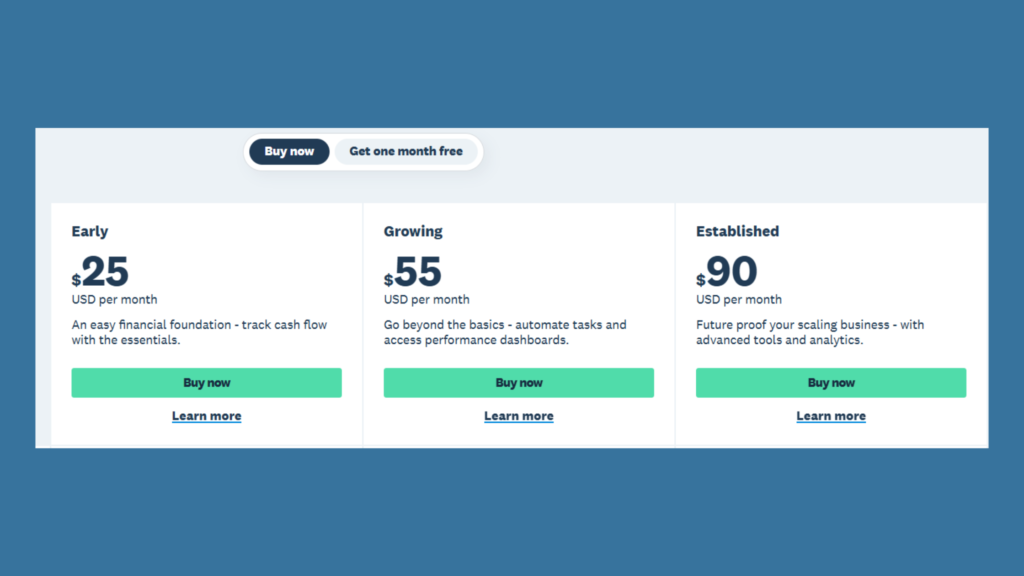
The image below shows a screenshot of the different plan that Xero offers. Each one is tailored to suit different businesses from Early / Startups, to Growing Businesses and Established Businesses.
Add-On Costs Small Businesses Often Overlook
The base subscription price is rarely the full picture.
Common add-ons include:
- Payroll (often priced per employee)
- Additional users
- Inventory management
- Time tracking
- Payment processing fees
These add-ons can significantly increase monthly costs if you’re not careful.
Free Accounting Software: Is It Really Free?
Some accounting tools advertise free plans, but it’s important to understand the limitations.
Free plans usually:
- Limit the number of transactions
- Restrict users
- Exclude payroll and automation
- Offer minimal support
Free software can work for very small or early-stage businesses, but it’s rarely a long-term solution.
➡️We break this down further in our guide to free accounting software for small businesses.
Accounting Software vs Excel: Cost vs Value
At first glance, Excel looks cheaper. There’s often no monthly fee, and many businesses already have access to it.
But Excel comes with hidden costs:
- Time spent on manual data entry
- Higher risk of errors
- No automation
- No built-in compliance support
Accounting software often saves money by:
- Reducing admin time
- Preventing costly mistakes
- Making tax prep easier
➡️If you’re unsure when Excel stops making sense, see accounting software vs Excel for small businesses.
What Should Small Businesses Budget for Accounting Software?
Instead of asking “What’s the cheapest option?”, ask:
- What features do I actually need?
- Will this still work in 12–24 months?
- What add-ons will I realistically need?
A practical rule of thumb
Most small businesses should expect to budget for:
- A core accounting plan
- One or two add-ons as they grow
Choosing the right plan upfront often costs less than switching software later.
How to Avoid Overpaying for Accounting Software
To keep costs under control:
- Don’t pay for features you don’t use
- Compare pricing tiers carefully
- Watch for annual billing discounts
- Choose scalable plans rather than switching tools frequently
Side-by-side comparisons make these differences much clearer.
Final Thoughts: Understanding Pricing Prevents Regret
Accounting software pricing isn’t about finding the lowest number — it’s about finding the best value for your business stage.
When you understand:
- How pricing tiers work
- What add-ons cost
- When free plans stop being enough
You can confidently choose software and avoid costly mistakes.
Ready to Compare Accounting Software Prices?
The fastest way to see what you’ll really pay is to compare tools side by side.
➡️Compare the best accounting software for small businesses to see pricing, features, and which plans make the most sense for your needs.