
Introduction
Running a digital agency means juggling client retainers, project budgets, team time tracking, ad spend reconciliation, and subcontractor payments—all while trying to stay profitable. The right accounting software doesn’t just track your money; it reveals which clients are actually making you money and which are quietly draining your resources.
After analyzing the specific needs of digital marketing agencies, creative agencies, and digital consultancies, we’ve identified the top accounting solutions that handle the unique complexity of agency finances.
- Quick Comparison: Top 5 for Digital Agencies
- Why Digital Agencies Need Specialized Accounting
- Our Top Pick for Most Digital Agencies: FreshBooks
- Runner-Up for Growing Agencies: Xero
- Best for Established Agencies: QuickBooks Online
- Best Budget Option: Zoho Books
- Best Time Tracking Integration: Harvest + QuickBooks/Xero
- Feature-by-Feature Comparison
- Special Considerations for Digital Agencies
- Implementation Timeline for Agencies
- Common Mistakes Digital Agencies Make
- Key Metrics Every Digital Agency Should Track
- Final Recommendation: Which Should You Choose?
- Getting Started: Your First 30 Days
- Additional Resources
Quick Comparison: Top 5 for Digital Agencies
| Software | Best For | Starting Price | Key Agency Feature | Rating |
|---|---|---|---|---|
| FreshBooks | Small agencies (2-10 people) | $19/mo | Time tracking & client billing | ⭐⭐⭐⭐⭐ |
| Xero | Growing agencies (10-30 people) | $15/mo | Unlimited users, project tracking | ⭐⭐⭐⭐⭐ |
| QuickBooks Online | Established agencies (30+ people) | $35/mo | Comprehensive features | ⭐⭐⭐⭐ |
| Zoho Books | Budget-conscious agencies | $15/mo | Built-in project management | ⭐⭐⭐⭐ |
| Harvest + QuickBooks | Time tracking focused | $12/mo + $35/mo | Best time tracking + accounting combo | ⭐⭐⭐⭐ |
Why Digital Agencies Need Specialized Accounting
Generic accounting software can handle invoices and expenses, but digital agencies have unique challenges:
Client Profitability Complexity: Your biggest client isn’t always your most profitable. Between team time, ad spend pass-throughs, subcontractor costs, and scope creep, true project margins are often shocking. You need software that tracks profitability by client, project, and service type.
Retainer Management: Tracking monthly retainers, hours consumed, rollover policies, and overage billing requires more than basic invoicing. You need to know in real-time if a client has burned through their monthly hours.
Multi-Service Revenue Streams: SEO, PPC, content marketing, social media management, web development—each service has different margins and delivery costs. You need visibility into which services drive profitability.
Ad Spend Reconciliation: Managing $50K monthly in Google Ads and Facebook Ads means tracking pass-through expenses accurately, reconciling platform charges, and billing clients correctly without eating the difference.
Team Time Tracking: Billable hours are your inventory. If you can’t track time accurately by project and team member, you can’t price services profitably or identify capacity issues.
Subcontractor Management: Freelance writers, designers, and developers are your extended team. You need to track what you owe them, allocate their costs to the right projects, and handle 1099 reporting.
Our Top Pick for Most Digital Agencies: FreshBooks
Why FreshBooks Wins for Small to Mid-Size Agencies
FreshBooks is purpose-built for service businesses that bill clients for time and projects. It’s not trying to be everything to everyone—it focuses on what agencies need most: effortless time tracking, beautiful client invoicing, and project profitability insights.
Key Features for Agencies
Time Tracking That Actually Gets Used: FreshBooks has the best time tracking interface we’ve tested. Your team can track time via desktop, mobile app, or browser. The one-click timer means people actually use it (unlike complex systems they avoid). You can track time by project, service type, and team member.
Project Budgeting & Tracking: Set up projects with time and expense budgets. Get real-time alerts when you’re approaching the limit. See immediately if a project is profitable or bleeding money. This visibility is gold for agency profitability.
Retainer Billing Made Easy: Set up retainer agreements with monthly hours allocated. Track hours consumed against the retainer. Bill for overages automatically. Roll over unused hours based on your policy. It’s all built-in without complex workarounds.
Client Portal Excellence: Clients get a branded portal where they can view proposals, approve estimates, see project progress, and pay invoices. This reduces back-and-forth emails and gets you paid faster.
Expense Tracking with Receipt Scanning: Mobile app lets you photograph receipts instantly. Expenses automatically categorize and attach to projects. This is critical for ad spend, stock photos, software subscriptions, and other client-related costs.
Beautiful, Professional Invoices: Templates are modern and customizable. Add your branding in minutes. Invoices look polished, which matters when you’re selling premium services. Automated payment reminders actually get you paid—agencies report 30% faster payment.
Reporting That Answers Agency Questions
- Project profitability by client
- Time tracked by team member
- Revenue by service type
- Outstanding invoices by client
- Team utilization rates
- Expense summaries by project
Pricing for Agencies
Lite Plan ($19/month):
- 5 billable clients
- Unlimited invoicing
- Time tracking
- Expense tracking
- Good for solo agencies or starting out
Plus Plan ($33/month):
- 50 billable clients
- Everything in Lite
- Proposals and estimates
- Team members (2 included)
- Project tracking
- Best for agencies with 2-10 people
Premium Plan ($60/month):
- Unlimited clients
- Everything in Plus
- Subcontractor management (unlimited)
- Advanced reporting
- Client retainers
- Best for agencies with 10-25 people
Select Plan (Custom pricing, starting ~$200/month):
- High-volume agencies
- Dedicated account manager
- Phone support priority
- Custom onboarding
What FreshBooks Lacks
No Built-in Payroll: You’ll need to integrate with Gusto ($40/mo + $6/employee) or use a separate payroll service.
Basic Inventory Management: If you sell products alongside services, you’ll hit limitations quickly.
Limited Advanced Reporting: Reports are clean and useful but not deeply customizable. You can’t build complex multi-dimensional reports.
Fewer Integrations Than QuickBooks: About 100+ integrations vs QuickBooks’ 750+. However, all the agency essentials are covered (Zapier, Slack, G Suite, payment processors).
Best For
- Creative agencies (design, branding, content)
- Digital marketing agencies (SEO, PPC, social)
- Web development agencies
- Consultancies billing by time
- Agencies with 2-25 employees
- Teams that prioritize ease of use over feature depth
Bottom Line: FreshBooks removes friction from billing clients and tracking profitability. If your agency bills primarily for time and you want something your team will actually use, FreshBooks is the sweet spot of functionality and usability.
Runner-Up for Growing Agencies: Xero
Why Xero Excels for Team-Based Agencies
If you’re scaling beyond 10 people, Xero’s unlimited user access becomes incredibly valuable. Plus, its reporting and project tracking capabilities are more sophisticated than FreshBooks.
Key Advantages for Agencies
Unlimited Users on All Plans: This is Xero’s killer feature. Pay $42/month and your entire team of 15, 20, or 30 people gets access. Compared to QuickBooks charging per user or FreshBooks limiting by plan, this is massive savings as you grow.
Superior Project Tracking: Xero’s project module lets you track profitability with more granularity. Set up projects with multiple phases, track time and expenses against each phase, and see margin by project segment. This matters for complex, multi-month agency engagements.
Excellent Reporting & Dashboards: Create custom reports that show exactly what you need: profitability by service line, revenue trends by client type, utilization rates by team member. The reporting engine is more powerful than FreshBooks, approaching enterprise-grade.
Multi-Currency Support: If you serve international clients or have overseas contractors, Xero handles 132 currencies natively. Exchange rates update automatically, and gain/loss calculations happen behind the scenes.
Bank Reconciliation Excellence: Xero’s bank rec interface is the best in the industry. Matching transactions is fast and intuitive. For agencies processing hundreds of transactions monthly (client payments, ad spend, subcontractor payments), this saves hours.
Strong API for Custom Integrations: Need to pull data into custom dashboards or integrate with proprietary tools? Xero’s API is robust and well-documented. Many agencies build custom reporting on top of Xero.
Pricing for Agencies
Early Plan ($15/month):
- 20 invoices, 5 bills per month
- Only suitable for brand new micro-agencies
Growing Plan ($42/month):
- Unlimited invoices and bills
- Unlimited users (HUGE value)
- Project tracking
- Multi-currency
- Best for agencies 5-30 people
Established Plan ($78/month):
- Everything in Growing
- Multi-currency
- Expenses module
- Projects with tracking codes
- Best for agencies 30+ people or complex needs
Add-Ons You’ll Need
Time Tracking: Xero doesn’t include time tracking. You’ll need:
- Harvest ($12/user/month) – Best standalone option
- TSheets ($8/user/month) – Solid alternative
- Clockify (Free basic, $10/user/mo pro) – Budget option
Payment Processing: 2.9% + $0.25 per card transaction
Hubdoc ($20/month): Receipt capture and document management. Not included but very useful for agencies.
What Xero Lacks
Steeper Learning Curve: Xero is more powerful but less intuitive. Expect 2-3 weeks for team to feel comfortable vs FreshBooks’ same-day productivity.
No Built-in Time Tracking: This is a dealbreaker for some agencies. The integrations work well but add cost and complexity.
Customer Support Can Be Slow: Email-based support with 24-48 hour response times is standard. Phone support costs extra.
Best For
- Growing agencies (10-30 employees)
- International agencies with foreign clients/contractors
- Agencies that need sophisticated reporting
- Teams comfortable with more complex software
- Agencies with tight budgets per-user (unlimited access)
Bottom Line: Xero is the best value for growing agencies that need team-wide access and powerful reporting. The lack of built-in time tracking is annoying, but the overall package—especially unlimited users—makes it hard to beat for scaling teams.
Best for Established Agencies: QuickBooks Online
Why QuickBooks for Larger Operations
Once you’re over 30 employees, generating $2M+ annually, and have complex needs (inventory, multiple departments, advanced payroll), QuickBooks Online Plus or Advanced becomes worth the investment.
Key Advantages for Larger Agencies
Most Comprehensive Feature Set: QuickBooks does everything: project tracking, class tracking (by department or service line), location tracking (multiple offices), inventory management, built-in payroll, advanced permissions, custom fields, and more. It’s the Swiss Army knife of accounting.
Largest Integration Ecosystem: 750+ integrations means whatever tools your agency uses, they likely connect to QuickBooks. CRM, project management, payment processors, marketing tools—everything talks to QuickBooks.
Accountant-Friendly: Every accountant knows QuickBooks. This saves you money on bookkeeping and tax prep because your accountant isn’t learning a new system.
Advanced Permissions & Controls: With 25+ team members, you need granular permission controls. QuickBooks Advanced lets you restrict access by role, limit what people can see and edit, and create approval workflows for expenses and bills.
Class & Department Tracking: Run separate P&Ls for your SEO division, PPC team, content department, and development group. See which service lines are profitable, which need attention, and where to invest resources.
Powerful Reporting: Customizable reports, scheduled report delivery, and report templates for specific analysis. The reporting depth exceeds FreshBooks and matches Xero.
Pricing for Agencies
Simple Start ($35/month):
- 1 user only
- Too limited for agencies
Essentials ($65/month):
- 3 users
- Bill management
- Time tracking
- Minimum viable for micro-agencies
Plus ($99/month):
- 5 users
- Project profitability tracking
- Inventory tracking
- Class tracking
- Best for agencies 5-25 people
Advanced ($235/month):
- 25 users
- Custom user permissions
- Dedicated support
- Advanced reporting
- Workflow automation
- Best for agencies 25+ people
Add-On Costs
QuickBooks Payroll: $45/month + $5 per employee QuickBooks Time (time tracking): $20/month + $8 per user QuickBooks Payments: 2.9% + $0.25 per transaction
What QuickBooks Lacks
User Limits Get Expensive: At $99/month for 5 users, scaling to 20 people means upgrading to Advanced at $235/month. Xero’s unlimited users is more cost-effective.
Interface Feels Dated: It works, but it’s not beautiful. FreshBooks and Xero feel more modern.
Customer Support Declining: QuickBooks has grown so large that support quality has dropped. Hold times are long, and you often don’t get expert help.
Feature Overload: All these features mean more complexity. Teams can feel overwhelmed. Training takes longer.
Best For
- Established agencies (30+ employees)
- Agencies over $2M revenue
- Complex organizations with multiple divisions
- Agencies that sell products + services
- Operations requiring advanced permissions and controls
Bottom Line: QuickBooks is overkill for small agencies but becomes the right choice as complexity grows. Once you have multiple departments, dozens of employees, and sophisticated reporting needs, the investment pays off.
Best Budget Option: Zoho Books
Why Zoho Books for Cost-Conscious Agencies
Zoho Books delivers 80% of FreshBooks’ functionality at half the price. If budget is tight but you still need project tracking, time tracking, and client billing, Zoho is remarkable value.
Key Features for Agencies
Built-in Time Tracking & Project Management: Unlike competitors, time tracking and project features are included in the Standard plan ($15/month). You get time sheets, project budgets, expense allocation, and basic project management.
Client Portal: Clients can view estimates, approve projects, see outstanding invoices, and make payments through a self-service portal.
Automation Workflows: Set up rules to automate repetitive tasks: auto-send invoices, payment reminders, expense approvals, recurring invoices for retainers. The automation is more advanced than you’d expect at this price.
Retainer Invoice Management: Track retainer agreements, hours consumed, and automatically bill when limits are exceeded. This is critical for agency retainer models.
Integration with Zoho Ecosystem: If you use Zoho CRM, Zoho Projects, Zoho Mail, or other Zoho products, the integration is seamless. Data flows between tools without manual exports.
Pricing
Free Plan ($0):
- 1 user
- 1,000 invoices per year
- For businesses under $50K revenue
- Good for solo freelancers testing waters
Standard Plan ($15/month):
- 3 users
- Time tracking
- Project tracking
- Client portal
- Best value for small agencies
Professional Plan ($40/month):
- 5 users
- Purchase orders
- Vendor portal
- Custom fields
- Workflow automation
Premium Plan ($60/month):
- 10 users
- Advanced automation
- Custom modules
- Warehousing (if you have inventory)
What Zoho Books Lacks
Clunky Interface: Zoho works but doesn’t feel as polished as FreshBooks or Xero. The learning curve is steeper.
Limited Integrations: Outside the Zoho ecosystem, integration options are more limited. Zapier helps bridge gaps but adds cost.
Support Can Be Slow: Email support is standard. Response times vary. Documentation is detailed but not always intuitive.
Best For
- Budget-conscious small agencies
- Agencies already using Zoho products
- Teams comfortable with less polished interfaces
- Agencies needing automation at low price point
Bottom Line: Zoho Books is exceptional value if you can handle the interface quirks. You get project tracking, time tracking, and client billing for $15/month—a fraction of competitors. Perfect for bootstrapped agencies.
Best Time Tracking Integration: Harvest + QuickBooks/Xero
Why Harvest for Time-Obsessed Agencies
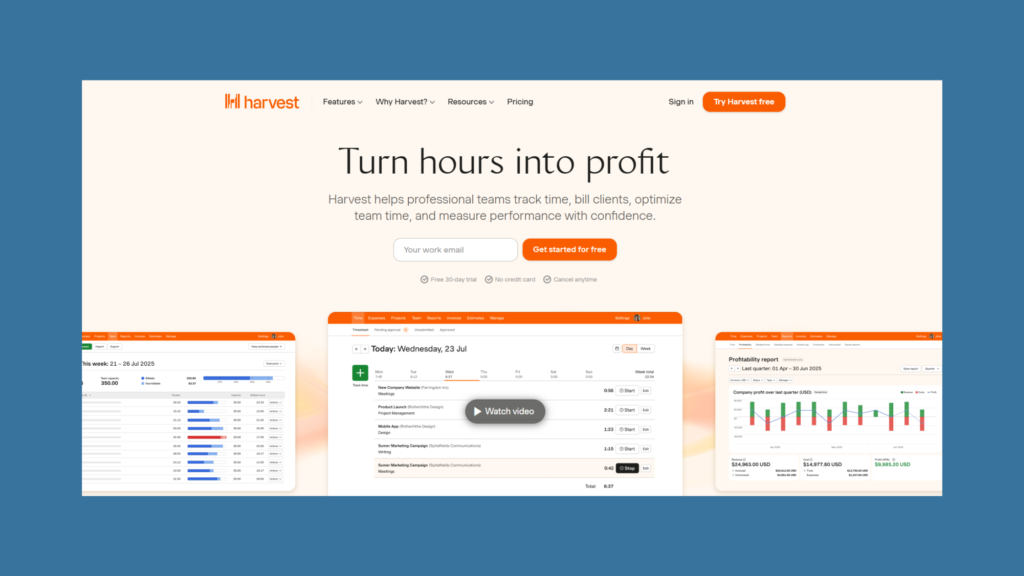
Some agencies live and die by billable hours. If time tracking is your #1 priority, Harvest is the gold standard, and it integrates beautifully with QuickBooks or Xero for accounting.
Why This Combo Works
Harvest’s Time Tracking Excellence
- One-click timers from desktop, mobile, or browser
- Intuitive interface that teams actually use
- Visual reports showing team capacity and utilization
- Detailed time breakdowns by client, project, and task
- Idle time detection to prevent forgotten timers
Seamless Integration
- Harvest syncs time entries directly to QuickBooks/Xero
- Time becomes line items on invoices automatically
- No double-entry or manual reconciliation
- Updates in real-time (or on schedule you set)
Combined Power Harvest handles time tracking (its specialty), while QuickBooks/Xero handles accounting (their specialty). You get best-of-breed for both critical functions.
Pricing
Harvest: ±$12/user/month (minimum 2 users = $24/month) QuickBooks Simple Start: ±$35/month Total: ±$59/month for 2-person agency
or
Harvest: ±$12/user/month Xero Early: $15/month Total: ±$39/month for 2-person agency (better value)
Best For
- Agencies where time tracking accuracy is critical
- Teams that struggled with other time tracking tools
- Agencies that want best-in-class for each function
- Organizations comfortable managing two platforms
Bottom Line: The Harvest + Xero combination gives you premium time tracking and unlimited user accounting for ~$50-60/month base cost. Hard to beat that value.
Feature-by-Feature Comparison
Time Tracking
| Software | Built-In? | Quality | Mobile App | Notes |
|---|---|---|---|---|
| FreshBooks | ✅ Yes | Excellent | ⭐⭐⭐⭐⭐ | One-click timers, intuitive |
| Xero | ❌ No | N/A | N/A | Requires Harvest, TSheets, etc. |
| QuickBooks | ⚠️ Add-on | Good | ⭐⭐⭐⭐ | QuickBooks Time costs extra |
| Zoho Books | ✅ Yes | Good | ⭐⭐⭐ | Functional but not polished |
| Harvest | ✅ Yes | Excellent | ⭐⭐⭐⭐⭐ | Best standalone option |
Project Profitability Tracking
| Software | Capability | Granularity | Real-Time? |
|---|---|---|---|
| FreshBooks | Excellent | By project & service | ✅ Yes |
| Xero | Excellent | By project phase | ✅ Yes |
| QuickBooks | Excellent | By project, class, location | ✅ Yes |
| Zoho Books | Good | By project | ✅ Yes |
| Harvest | Limited | Time only, no expenses | ✅ Yes |
Retainer Management
| Software | Retainer Support | Hours Tracking | Overage Billing |
|---|---|---|---|
| FreshBooks | ✅ Excellent | ✅ Automatic | ✅ Automatic |
| Xero | ⚠️ Manual setup | ⚠️ Manual tracking | ⚠️ Manual |
| QuickBooks | ⚠️ Requires setup | ✅ Good | ⚠️ Manual |
| Zoho Books | ✅ Good | ✅ Good | ✅ Automatic |
| Harvest | ✅ Excellent | ✅ Automatic | ⚠️ Alert only |
Team Collaboration
| Software | User Limits | Permissions | Team Features |
|---|---|---|---|
| FreshBooks | 2-50 by plan | Good | Time tracking, expenses |
| Xero | ✅ Unlimited | Excellent | Full collaboration |
| QuickBooks | 1-25 by plan | Excellent | Advanced controls |
| Zoho Books | 1-15 by plan | Good | Basic collaboration |
| Harvest | By plan | Good | Time & expense focus |
Reporting for Agencies
Most Important Reports for Digital Agencies:
- Project Profitability: Revenue vs costs by project
- Client Profitability: Which clients make you money
- Service Line Performance: Which services are most profitable
- Team Utilization: Billable vs non-billable hours
- Outstanding Invoices: AR aging by client
- Revenue Recognition: For retainer revenue management
Software Rankings for Agency Reporting:
- Xero – Most customizable, best dashboards
- QuickBooks – Comprehensive, slightly less intuitive
- FreshBooks – Clean and useful but less customizable
- Zoho Books – Functional but requires technical knowledge
- Harvest – Limited to time tracking data only
Special Considerations for Digital Agencies
Ad Spend Management
The Challenge: You manage $50K/month in Google Ads and Facebook Ads. Platform charges go to your card, you bill clients, but reconciling the difference is messy.
Best Practices:
- Use a dedicated credit card for ad spend only
- Create separate expense accounts for each platform (Google Ads, Facebook Ads, LinkedIn Ads)
- Use class/project tracking to allocate to specific clients
- Reconcile monthly comparing platform invoices to card statements
- Bill clients with markup clearly shown (e.g., “Ad Spend: $5,000 + 10% management”)
Software That Handles This Best: QuickBooks Online (class tracking by client) or Xero (tracking categories)
Subcontractor Management
The Challenge: You have 5-10 regular freelancers doing specialized work. You need to track what you owe them, allocate costs to projects, and handle 1099 reporting.
Best Practices:
- Set up subcontractors as vendors in your system
- Enter bills when work is completed, not when you pay
- Allocate bills to specific projects to track true project costs
- Use 1099 tracking features to automatically categorize
- Export 1099 reports in January for tax filing
Software That Handles This Best: FreshBooks Premium (unlimited subcontractor tracking) or QuickBooks Plus
Retainer Revenue Recognition
The Challenge: Client pays $5,000 retainer for services you deliver over 3 months. How do you recognize revenue correctly?
Accounting Methods:
- Cash Basis: Recognize all $5,000 when received (simpler, okay for small agencies)
- Accrual Basis: Recognize proportionally as services delivered (more accurate, required for larger agencies)
Best Practice:
- Record retainer payment as liability (unearned revenue)
- Each month, reclassify portion of retainer to revenue based on delivery
- Track hours consumed against retainer to measure delivery
- Use project tracking to ensure you’re profitable on retainer work
Software That Handles This Best: FreshBooks (built-in retainer features) or QuickBooks (with proper setup)
Multi-Service Revenue Tracking
The Challenge: You offer SEO, PPC, content marketing, web development, and social media. You need to know which services are profitable.
Best Practice:
- Create separate income accounts for each service line
- Use class or location tracking for additional dimensions
- Allocate team time to specific service types in timesheets
- Review service line P&Ls quarterly
- Adjust pricing and focus based on profitability data
Software That Handles This Best: QuickBooks (class tracking), Xero (tracking categories), or FreshBooks (service items)
Implementation Timeline for Agencies
Week 1: Setup & Configuration
Day 1-2: Company Setup
- Create an account and input the company details
- Set fiscal year and accounting method
- Connect bank accounts and credit cards
- Configure tax settings
Day 3-4: Chart of Accounts
- Customize accounts for agency needs:
- Income: By service type (SEO, PPC, Content, etc.)
- Expenses: Team costs, ad spend, software, subcontractors
- Track retainer revenue and unearned revenue properly
- Import existing customers and set up projects
Day 5-7: Templates & Automation
- Design invoice templates with branding
- Set up recurring invoices for retainer clients
- Create expense categories for common costs
- Set up bank rules for automatic categorization
Week 2: Team Onboarding
Team Training
- Account managers: Invoice creation, project setup
- Team members: Time tracking, expense submission
- Finance lead: Reconciliation, reporting, approval workflows
Test Workflows
- Create a test project and track time
- Submit the test expense with the receipt
- Generate a test invoice and process payment
- Run sample reports
Week 3: Migration & Go-Live
Data Migration
- Import current year transactions
- Enter open invoices (unpaid client invoices)
- Enter unpaid bills (what you owe vendors/subcontractors)
- Import project list with budgets
Parallel Testing
- Run old and new systems simultaneously for 2 weeks
- Compare outputs to verify accuracy
- Train team on resolving discrepancies
Week 4: Optimization
Refine Processes
- Adjust automation rules based on real usage
- Update project tracking methods
- Optimize report templates
- Set up dashboards for key metrics
Common Mistakes Digital Agencies Make
Mistake #1: Not Tracking Time Consistently
The Problem: Team members forget to track time, estimate after the fact, or don’t track internal projects.
The Cost: You can’t price services accurately, can’t identify unprofitable clients, and lose billable hours.
The Fix: Make time tracking mandatory and easy. Use one-click timers. Review utilization weekly. Tie performance reviews to time tracking compliance.
Mistake #2: Not Allocating All Costs to Projects
The Problem: You track labor costs but not software subscriptions, ad spend, stock photos, or other project costs.
The Cost: Projects look more profitable than they are because you’re not counting all costs.
The Fix: Allocate every expense to a client or project. Tag expenses as they’re incurred. Review project P&Ls monthly.
Mistake #3: Poor Retainer Hour Tracking
The Problem: You sell 40-hour monthly retainers but don’t track consumption. Clients use 60 hours but you don’t bill for overages.
The Cost: You’re giving away free work—potentially $10,000+ annually per retainer client.
The Fix: Track retainer hours religiously. Set up alerts at 80% consumed. Bill overages immediately. Have tough conversations with clients who consistently exceed limits.
Mistake #4: Not Reconciling Ad Spend
The Problem: Google and Facebook charges don’t match what you bill clients. The $500 difference accumulates.
The Cost: You absorb thousands in ad spend annually because reconciliation is too tedious.
The Fix: Dedicated card for ad spend. Monthly reconciliation comparing platform invoices to card statements to client billing. Investigate any discrepancies immediately.
Mistake #5: Not Separating Service Lines Financially
The Problem: You know total revenue but not which services are profitable.
The Cost: You invest equally in all services when maybe SEO is highly profitable and social media is a loss leader.
The Fix: Track revenue and costs by service line. Run quarterly P&Ls by service type. Make strategic decisions based on data.
Mistake #6: Not Monitoring Client Profitability
The Problem: Your biggest client by revenue is actually losing you money due to scope creep and underpricing.
The Cost: You prioritize unprofitable work over profitable opportunities.
The Fix: Run client profitability reports quarterly. Calculate true cost including team time, ad spend, and overhead. Have pricing conversations with unprofitable clients.
Key Metrics Every Digital Agency Should Track
Financial Metrics
Monthly Recurring Revenue (MRR)
- Retainer value across all clients
- Measures stability and predictability
- Track monthly growth rate
- Target: 70%+ of revenue from MRR
Gross Margin by Service
- Revenue minus direct costs (team time, contractors, ad spend)
- Shows which services are actually profitable
- Target: 50-70% gross margin on services
Client Acquisition Cost (CAC)
- Marketing + sales costs ÷ new clients acquired
- Must be recovered within 12 months for health
- Target: Recover CAC in 4-6 months
Client Lifetime Value (LTV)
- Average client revenue × average retention time
- Should be 3x+ your CAC
- Target: LTV:CAC ratio of 3:1 or higher
Operational Metrics
Team Utilization Rate
- Billable hours ÷ total available hours
- Measures team efficiency
- Target: 70-80% utilization
Revenue Per Employee
- Total revenue ÷ number of employees
- Measures productivity and scalability
- Target: $150,000-$200,000 per employee
Project Margin
- (Project revenue – project costs) ÷ project revenue
- Measures profitability by engagement
- Target: 40%+ project margin
Average Revenue Per Client
- Total revenue ÷ number of active clients
- Measures account value
- Target: Growing year-over-year
How Your Accounting Software Helps
FreshBooks: Project profitability reports, time tracking reports, team utilization Xero: Custom dashboards, tracking categories for service lines, detailed P&L by dimension QuickBooks: Class tracking for services, advanced custom reports, budget vs actual Zoho Books: Project reports, time and expense reports, profitability tracking
Final Recommendation: Which Should You Choose?
If You’re a 2-10 Person Agency
Choose FreshBooks Premium ($60/month)
- Easiest time tracking that teams actually use
- Excellent client billing and retainer management
- Project profitability tracking built-in
- Professional client portal
- Your team will be productive from day one
If You’re a 10-30 Person Agency
Choose Xero Established ($78/month)
- Unlimited users saves massive costs as you scale
- Superior reporting for data-driven decisions
- Strong project tracking with phases
- Great value for growing teams
- Add Harvest ($12/user/month) for time tracking
If You’re a 30+ Person Agency
Choose QuickBooks Online Advanced ($235/month)
- Advanced permissions for complex organizations
- Class tracking for multiple service lines
- Department tracking for P&L by division
- Largest integration ecosystem
- Most comprehensive features for established operations
If Budget Is Your Primary Concern
Choose Zoho Books Standard ($15/month)
- Built-in time tracking and project management
- Client portal and retainer billing
- 3 users included at this price
- 80% of FreshBooks functionality at 1/4 the price
- Accept the learning curve as cost of savings
If Time Tracking Is Your #1 Priority
Choose Harvest + Xero combo (~$50-75/month base)
- Best time tracking interface available
- Unlimited users via Xero
- Strong project tracking and reporting
- Seamless integration between platforms
- Best-of-breed approach for both functions
Getting Started: Your First 30 Days
Week 1: Sign Up & Configure
- Start a free trial of your chosen software
- Set up the company profile and branding
- Connect bank accounts and credit cards
- Create a chart of accounts for agency needs
- Design invoice templates
Week 2: Import & Test
- Import customer list with contact info
- Set up active projects with budgets
- Enter team members and set permissions
- Test time tracking workflow
- Create a test invoice and process payment
Week 3: Team Training
- Train team on time tracking (critical!)
- Show account managers how to invoice
- Teach expense submission with receipts
- Review the project tracking process
- Practice generating reports
Week 4: Go Live
- Migrate from the old system or spreadsheets
- Begin tracking all time in the new system
- Issue the first real invoices
- Reconcile the first month
- Set up recurring retainer invoices
Additional Resources
Integrations for Agencies
- Harvest (time tracking)
- Asana / Monday.com (project management)
- Slack (team communication)
- Zapier (automation)
- Gusto (payroll)
Need Help Choosing? Consider:
- Team size (affects user costs)
- Current tech stack (integration needs)
- Team technical comfort (ease of use vs power)
- Budget (total cost including add-ons)
- Growth plans (scalability requirements)
Still unsure? Start with FreshBooks if you’re under 15 people, or Xero if you’re 15-30 people. Both have excellent free trials, so you can test before committing.
Last Updated: February 14, 2026 | Have questions or suggestions? Let us know